


Cloud-Based Access Control Gates: Managing Security Remotely
2025-10-27


For decades, the "brain" of a building's security system was a physical object: a heavy, humming server locked in an IT closet. This on-premise "brain" was the single point of failure. It was expensive to buy, complex to maintain, and impossible to manage unless you were physically standing in that same closet. Adding a new door, or (heaven forbid) a new office, was a-months-long, five-figure project.
That era is definitively over. The "brain" of modern access control has moved to the cloud.
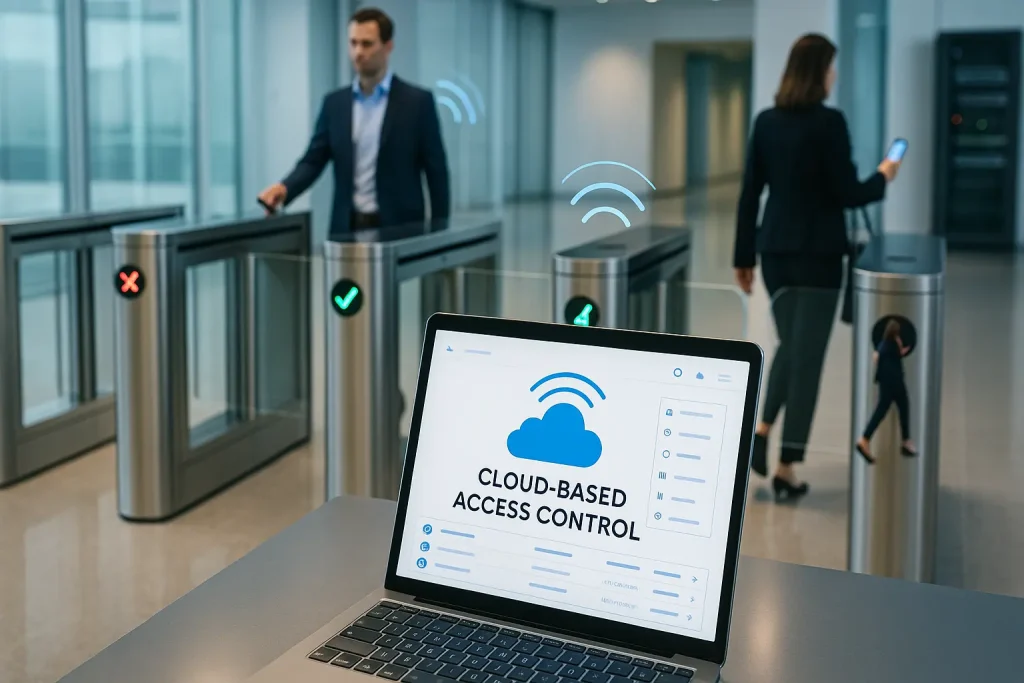
The cloud-based access control gate is the new standard for modern facilities. This is a fundamental shift in architecture, moving the intelligence, management, and data from a "box in the closet" to a secure, scalable, and globally accessible platform. This technology untethers your security from your physical location, allowing you to manage an entire global portfolio of buildings from a single web browser or smartphone.
This guide is a comprehensive, expert look at this transformative solution. We'll explore what "cloud-based" truly means, how it's more secure and scalable than the old model, and how it serves as the essential backbone for all modern smart-access-solutions.
What Is a Cloud-Based Access Control Gate?
A cloud-based access control gate is an entry system where the physical gate hardware (the "muscle") is installed on-site, but the management software, user database, and event logs (the "brain") are hosted and managed remotely on the internet (in "the cloud").
This "decoupling" of the hardware and software is the key innovation. In this model, often called ACaaS (Access Control as a Service), the local hardware (the gate and reader) simply talks to the cloud over a secure internet connection to ask, "Is this person allowed?" The cloud "brain" makes the decision and sends the "open" or "deny" command back, all in a fraction of a second.
How Is This Different from Traditional On-Premise Systems?
A traditional on-premise system is a closed, siloed box. All software, all user data, and all event logs are stored on a local server and panels within your building. A cloud-based system, by contrast, is an open, connected, and scalable platform that you access as a service.
As an integrator, I've spent twenty years replacing old on-premise systems, and the "character" of each is completely different. An on-premise system is brittle, heavy, and isolated. A cloud system is flexible, light, and connected.
Here is a direct, practical comparison:
| Feature | Traditional On-Premise System | Cloud-Based Access Control Gate |
| "The Brain" | A physical server in your IT closet. | A secure, remote platform (SaaS) hosted by a provider. |
| Management | On-site only (or via a clunky, insecure VPN). | Global remote management from any web browser or mobile app. |
| Scalability | Difficult & Expensive. Requires new hardware, wiring, and software licenses for each new site. | Infinitely Scalable. Add a new gate or a new building in minutes with a few clicks. |
| Updates | Manual & Costly. Requires a technician to come on-site to patch software. | Automatic & Free. Your platform is always patched and updated with the latest features. |
| Upfront Cost | High (CapEx). You must buy the server, software licenses, etc. | Low (OpEx). You pay a monthly or annual subscription fee. No server to buy. |
| Data Backup | Your responsibility. (If the server dies, you lose everything). | Automatic & Redundant. Managed by the cloud provider. |
| Integration | Difficult. Uses old, proprietary protocols. | Easy. Built on modern, open APIs to connect to video, visitor management, etc. |
| Maintenance | High. You must maintain and eventually replace the server. | Zero. The provider handles all server maintenance. |
How Does the "Cloud" Architecture Actually Work?
The system works by using an on-site "controller" or "smart hub" as a secure gateway. This device connects your physical hardware (the gate and reader) to the internet. It communicates with the cloud platform using encrypted messages to verify credentials and download new rules.
This "data flow" is the key to understanding the system. Let's trace a single "tap-and-go" event:
- The Tap: An employee taps their card (or phone) on the reader at your lobby's advanced gate.
- The Local Query: The reader sends the credential's data to the on-site IP controller (the "local brain").
- The Secure Handshake: The controller encrypts this request and sends it over your standard internet connection to the cloud platform (the "central brain").
- The Cloud Decision: The cloud platform receives the request. In milliseconds, it checks its massive database: "Is User #5150 allowed at the 'Main Lobby' on a Tuesday at 10:03 AM?"
- The Command: The cloud finds the user, confirms their permissions are valid, and sends an encrypted "OPEN" command back to the on-site controller.
- The Action: The controller receives the "OPEN" command and sends a simple "open" signal to the gate's motor.
- The Passage: The barriers open. The employee walks through.
This entire round-trip, from tap to open, is engineered to happen in under a second.
What Are the Main Benefits of Moving Your Gates to the Cloud?
The main benefits are true global remote management (freedom from the server closet), massive scalability (adding new sites is easy), and a lower total cost of ownership (TCO) by eliminating hardware maintenance and converting a large capital expense into a predictable operating expense.
Benefit 1: True Remote Management (The "Freedom" Benefit)
This is the "character" of a cloud system. You are no longer tethered to a physical location.
- The "Old" Way: An employee loses a badge at 8 PM on a Friday. You have to drive back to the office, log in to the server in the closet, and manually deactivate their card.
- The "Cloud" Way: An employee loses a badge. You pull out your smartphone (from the couch, from dinner, from another country), open the app, search their name, and tap "Deactivate." The crisis is averted in 10 seconds.
This ability to manage all your doors, all your users, and all your schedules for your entire global portfolio from a single web browser is a revolutionary shift in efficiency.
Benefit 2: Massive Scalability (The "Growth" Benefit)
A cloud platform is built to be elastic. This is a game-changer for growing businesses.
- The "Old" Way: You want to open a new 10-person office in a different city. This is a nightmare. You have to buy a new server, new software licenses, and hire an integrator. You then have to figure out how to link the two systems (often with a clunky, insecure VPN) so one badge can work at both locations.
- The "Cloud" Way: You open the new office. You install a cloud-ready controller and a gate. You log in to your existing cloud platform, click "Add Site," and... that's it. The new office is now part of your global network. The same credentials work everywhere, managed from one place.
Benefit 3: Lower Total Cost of Ownership (TCO)
A cloud system moves your spending from a huge, one-time Capital Expenditure (CapEx) to a predictable, manageable Operating Expenditure (OpEx).
- No Server to Buy: You eliminate the $5,000 - $15,000+ upfront cost of an access control server.
- No Server to Maintain: You eliminate the ongoing costs of power, cooling, and IT maintenance for that server.
- No Server to Replace: You eliminate the "capital refresh" cycle, where you have to buy a whole new server every 5-7 years.
Benefit 4: Automatic Updates & "Future-Proofing"
This is a massive, often overlooked, benefit.
- Security: Your
cloud-based access control gateis always up-to-date. The provider is constantly pushing new security patches and features to the platform. You don't have to do anything. Your system is never left vulnerable to the latest-discovered exploit. - Features: When the provider develops a new feature (e.g., a new type of visitor pass, a new analytics dashboard), it just appears in your software. You get "new" features for free, constantly. Old on-premise software might get one "major update" every three years, which you have to pay and schedule to install.
Benefit 5: Seamless Integrations (The "Smart" Benefit)
This is the key to unlocking true smart-access-solutions. Cloud platforms are built on Open APIs (Application Programming Interfaces). This means they are designed to "talk" to other cloud-based apps.
- HR Systems: Automatically create a new employee's access credential when they are added to your HR platform (like Workday or BambooHR).
- Video (VSaaS): Link a "door forced open" alarm to the exact 10-second video clip from your cloud video camera.
- Visitor Management: Automatically provision a QR code for a visitor when they are booked in your VMS.
This integration is what allows your access control system to become the central "hub" of your entire building's technology stack.
But Is My Access Control "In the Cloud" Secure?
This is, without question, the #1 most important and valid concern that clients have. If my "brain" is on the internet, doesn't that make it less secure?
The answer is no. A high-quality cloud-based access control gate system is, in almost every case, significantly more secure than a traditional on-premise server.
Here's why:
- Encryption Is Everything: All communication between your building and the cloud is heavily encrypted (e.g., with AES-256 encryption, the same standard used for online banking). Even if a hacker "sniffed" the traffic, it would just be unintelligible.
- Datacenter Security vs. "Your Closet":
- Your Closet: Your on-premise server is in a closet, protected by one locked door. It's vulnerable to physical theft, fire, floods, and power outages.
- The Cloud: Your platform is hosted in a high-security, professional data center (like Amazon Web Services or Microsoft Azure). These facilities have 24/7/365 security, redundant power, redundant internet, and are protected by a level of cloud computing security that no normal business could ever afford.
- Dedicated Security Teams: The cloud provider has a team of world-class security experts whose only job is to monitor the platform 24/7 for threats. Your IT admin is (no offense) also busy fixing a printer.
A "server in a closet" connected to the internet for remote access (a common setup) is a massive, gaping vulnerability. A true cloud platform is a purpose-built, high-security fortress.
What Happens to My Gates if the Internet Goes Down?
This is the second most common (and critical) question. Will my gates stop working?
No. A well-designed cloud-based access control gate system continues to function perfectly, even when the internet is down.
This is because the "local brain"—the on-site IP controller—is smart. It "caches" (stores) a copy of all the user permissions.
- When Internet is ON: The controller is in constant sync with the cloud, getting real-time updates (e.g., "User A is now deactivated").
- When Internet Goes OFF: The controller simply switches to "Offline Mode." It uses its local, cached copy of the database to make decisions.
- The Experience: Your employees can still "tap" and go. The gates still open. They will not even notice the internet is down. The controller also stores all the event logs (who badged in/out) locally.
- When Internet is ON Again: The controller re-connects to the cloud and "syncs" all the event logs that happened during the outage.
The only thing you can't do during an outage is "real-time remote management" (like adding a new user from your phone). But the core security of the building remains 100% intact.
What's Involved in Migrating to a Cloud-Based Gate System?
Migrating from an old on-premise system is a strategic project. It involves auditing your existing hardware, choosing the right "open" platform, and phasing the rollout.
Step 1: Audit Your "Bones" (Network & Hardware)
A cloud system needs a stable internet connection.
- Network: Is your building's internet connection reliable? Do you have network (Ethernet) drops near your access points?
- Hardware: This is the big-money question. Are your existing readers and gates "proprietary" (locked to your old vendor)? Or are they "open" (using standard Wiegand or OSDP protocols)?
- My "Retrofit" Anecdote: I've had many clients who wanted to "just swap the brain." But we discover their 20-year-old readers use a proprietary, encrypted signal that the new cloud controller can't understand. This meant they had to replace every single reader in the building, tripling the project cost. You must audit your existing hardware first.
Step 2: Choose an "Open" Platform (The API)
This is the most important decision you will make.
- A "Closed" Cloud System (The Trap): Some vendors offer a "cloud" system, but it only works with their proprietary gates and their proprietary readers. You are still locked in.
- An "Open" Cloud System (The Future): This is the goal. An "open API" platform means it's designed to work with hardware from any manufacturer. You can use their cloud "brain" with your existing gates, and add new, different-branded
smart-access-solutionslater. Always choose an open platform.
Step 3: The Phased Rollout
You don't have to "flip the switch" overnight.
- My Expert Advice: Start with one building, or even just one floor.
- Install the new cloud controllers in parallel with your old system.
- Run both for a week, letting employees use either their old card or a new mobile credential.
- Once you've confirmed 100% stability, you decommission the old server. This "phased" approach ensures zero downtime and a smooth user transition.
The Future: AI, Data Analytics, and the "Global Brain"
The cloud-based access control gate is the platform for the future of smart buildings. Because all the data is in one "data lake," the potential for AI and machine learning is limitless.
- Predictive Analytics: The cloud "brain" will analyze flow data from 100 buildings and learn a "normal" baseline. It will then be able to proactively alert you: "Building 34's Tuesday morning entry is 40% below normal. This is an anomaly."
- Global Identity Management: The future is a single, "global identity." Your one credential (on your phone) will be your key to every office, parking garage, and gate, in every country, with permissions managed seamlessly from one central hub.
- AI-Driven Security: The cloud will be able to correlate a "door forced open" alarm at an
intelligent access-gatewith a "firewall breach" alert from your IT system, identifying a sophisticated, blended cyber-physical threat in real-time.
The Cloud Is the New Standard
The cloud-based access control gate is no longer a "future" trend; it is the "now" standard. The old, on-premise server-in-a-closet model is officially obsolete.
Moving your access control "brain" to the cloud provides unparalleled freedom, flexibility, and scalability. It lowers your total cost of ownership, eliminates the burden of maintenance, and makes your system more secure, not less. It is the essential foundation for building a truly smart, connected, and efficient facility, and the central nervous system for all next-generation smart-access-solutions.
