


Biometric Speed Gate Turnstiles: Secure Access with Identity Verification
2025-10-27


For decades, building security has been based on a simple, flawed concept: "what you have." A plastic card, a metal key, or a key fob. This system's fundamental weakness is that these "tokens" can be lost, stolen, forgotten, or intentionally "loaned" to a colleague. When a borrowed card is used, your expensive security system logs a valid entry, all while a completely unauthorized person walks right through your door.
This is the problem that keeps security directors up at night. The solution is to move from "what you have" to "who you are."
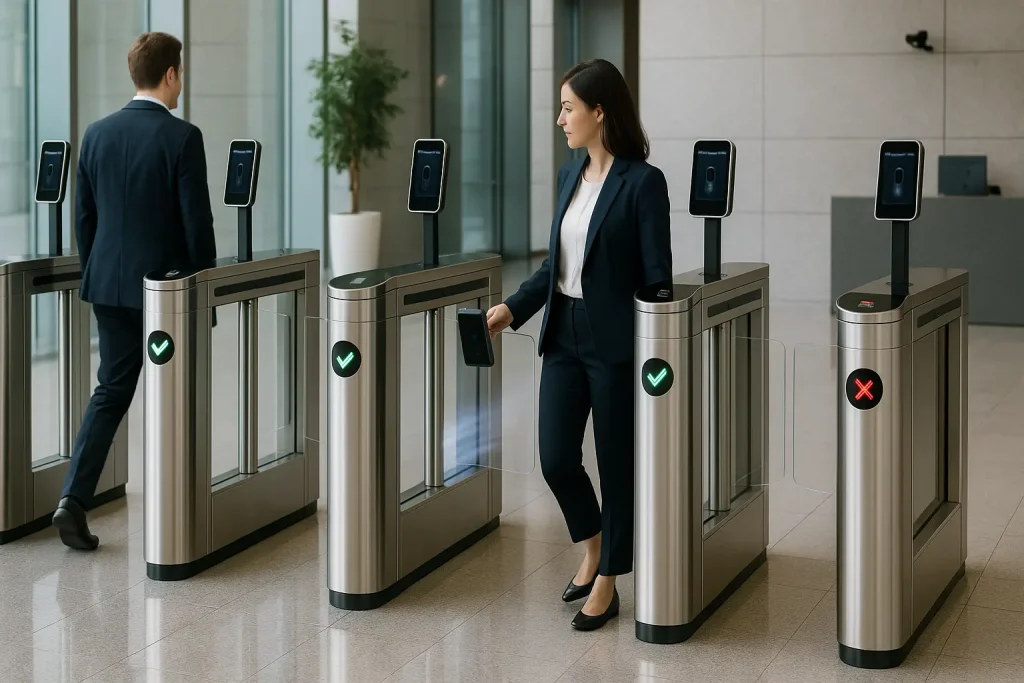
This is the power of the biometric speed gate turnstile. It represents the ultimate fusion of two technologies: high-security identity verification (biometrics) and high-speed physical access control (speed gates). This system doesn't just ask, "Do you have a key?" It asks, "Are you really the person who is allowed to enter?"
This guide is a comprehensive, practical deep-dive into this transformative technology. We'll explore how it works, the different types of biometrics, the critical privacy questions, and how this system provides the highest level of security without sacrificing speed.
What Is a Biometric Speed Gate Turnstile?
A biometric speed gate turnstile is an advanced access control system that combines a physical speed gate with a biometric scanner. Instead of a card reader, it uses a person's unique biological traits—like their face, fingerprint, or iris—to verify their identity before automatically opening its barriers.
This system is made of two core, integrated components:
- The Biometric Scanner (The "Authenticator"): This is the "brain" that verifies identity. It's the camera, fingerprint pad, or iris scanner that captures a user's unique data and matches it against a secure database.
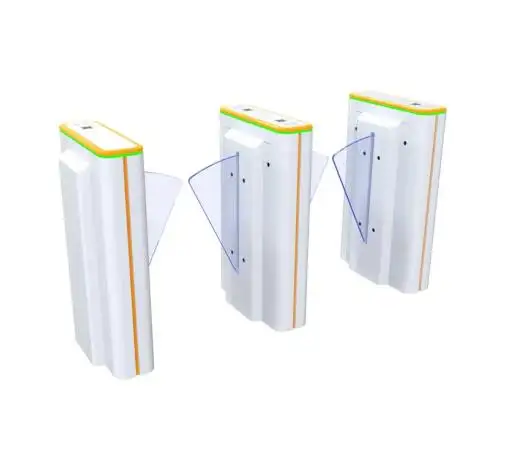
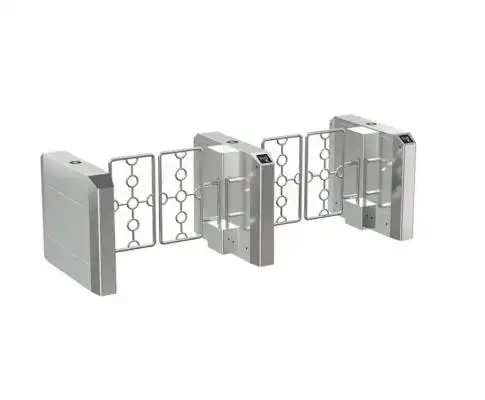
- The Speed Gate Turnstile (The "Enforcer"): This is the "muscle." It's the physical, motorized barrier (often glass wings or flaps) from a modern speed gate system that enforces the "open" or "deny" command from the scanner.
The key difference is that a traditional RFID speed gate system only verifies the credential. A biometric system verifies the person, permanently solving the problem of lost, stolen, or shared keys.
How Does This Biometric Integration Actually Work?
The system works by first enrolling a user's biometric data into a secure database as a encrypted template. When that user approaches the gate, a scanner reads their biometric feature, matches it against the stored template, and—if a match is found—sends a simple "open" signal to the turnstile's motor, all in a matter of seconds.
This process, while complex behind the scenes, is remarkably simple for the user. It involves two distinct phases: enrollment and verification.
Phase 1: Enrollment (The One-Time Setup)
Before the system can be used, every authorized person must be enrolled. This is a crucial, one-time process.
- A high-resolution scanner (e.g., a camera or fingerprint reader) captures a person's biometric data.
- The system's software analyzes this data. For a face, it maps dozens of "nodal points" (the distance between eyes, nose, chin). For a fingerprint, it maps the unique "minutiae" (ridges and valleys).
- Critically, the system does not store a "photo" or a "fingerprint image." It converts this unique geometry into a secure, encrypted mathematical template—a string of numbers.
- This encrypted template is stored in the database, linked to the user's identity.
Phase 2: Verification (The Daily "Handshake")
This is what the user experiences every day:
- The Scan: The user approaches the turnstile and presents their biometric (e.g., they look at a camera or touch a fingerprint reader).
- The Match: The scanner instantly captures a new template and compares it to the millions stored in the database, searching for a match.
- The "Handshake": Once a match is confirmed, the biometric controller sends a simple, secure "open" signal (a dry contact) to the turnstile's logic board.
- The Passage: The speed gate's motor activates, and the barriers open. The user walks through.
- The Security: As the user passes, the gate's own internal sensors (its anti-tailgating speed gate sensors) take over to ensure only one person passes for that single authentication.
This entire "handshake" process is the core of a modern high-speed access control system, blending high-tech identity verification with high-speed physical security.
What Are the Main Types of Biometric Scanners Used?
The most common types are facial recognition (for speed and convenience), fingerprint/finger vein (for high security and cost-effectiveness), and iris recognition (for the highest level of accuracy, often used in data centers).
Each technology has its own "character" and is suited for different environments.
Facial Recognition: The "Frictionless" Standard
This technology uses AI-powered cameras to identify a person's unique facial geometry (the shape and position of features). It's the fastest-growing and most popular choice for modern speed gates.
- How it Works: A camera captures a 3D or 2D image of a face and maps its nodal points. This map is compared to the database.
- Pros:
- Truly "Frictionless": The user doesn't have to stop, touch anything, or even take their hands out of their pockets. This is the ultimate in user convenience.
- High Throughput: Because users don't have to stop, a facial recognition gate maintains the highest possible "people per minute" (PPM), making it a true high-throughput speed gate.
- Cons:
- Privacy Concerns: This is the #1 hurdle (which we'll address).
- External Factors: Can be affected by extreme lighting changes, sunglasses, or (in some older systems) face masks.
Fingerprint/Finger Vein: The "High-Trust" Standard
This is the classic biometric, trusted for decades. It requires a user to physically interact with a scanner.
- How it Works: The user places their finger on a scanner, which reads their unique print. A more advanced version, "finger vein," scans the unique, subcutaneous vein pattern inside the finger, which is impossible to fake.
- Pros:
- High Accuracy: Very low "False Acceptance Rate" (FAR).
- Cost-Effective: The technology is mature and less expensive.
- Widely Accepted: People are used to this from their smartphones.
- Cons:
- It's NOT Fast: It is not a high-throughput solution. The user must stop, place their finger, and wait. This can create queues.
- Hygiene: It's a "touch"-point, a major concern in a post-pandemic world.
- Failure Rates: Can be affected by dry, wet, dirty, or scarred fingers.
Iris Recognition: The "High-Security" Standard
This technology scans the unique, complex, and colorful patterns of a person's iris. It is considered one of the most accurate and secure biometrics available.
- How it Works: A specialized, high-resolution camera scans the user's iris from a short distance.
- Pros:
- Extreme Accuracy: The iris has over 200 unique points of comparison (vs. ~40 for a fingerprint). The chance of a false match is near zero.
- Stable: The iris pattern is set by age 2 and never changes.
- Cons:
- High Cost: This is the most expensive solution.
- User Experience: Requires the user to stop and align their eye with the scanner, which can be finicky and slow.
- Best For: Ultra-high-security areas like data centers, labs, or bank vaults, not a busy corporate lobby.
| Biometric Type | Speed (Throughput) | Security Level | Convenience | Cost |
| Facial Recognition | Very High | High | Very High (Touchless) | High |
| Fingerprint | Low | High | Medium (Touch) | Low-Medium |
| Finger Vein | Low | Very High | Medium (Hover) | Medium |
| Iris Recognition | Low | Extremely High | Low (Requires alignment) | Very High |
Export to Sheets
What Are the Core Benefits of Using Biometric Gates?
The main benefits are a massive increase in security (credentials can't be lost, stolen, or shared), greater convenience (nothing to carry or forget), and a more accurate audit trail (knowing who entered, not just what card was used).
1. Dramatically Enhanced Security (The "Who")
This is the primary driver. A biometric system solves the fundamental flaws of traditional access.
- No "Credential Sharing": You can't lend your face to a coworker. This single-handedly eliminates "buddy punching" (where one employee clocks in for another), a practice that costs companies billions annually.
- No Lost or Stolen "Keys": An
rfid speed gate systemcard can be lost or stolen. The administrative cost and security risk of this is significant. A biometric cannot be "lost." - Non-Repudiation: The system log is now a 100% accurate, undeniable record. An RFID log shows "Card #0451 entered at 9:01 AM." A biometric log shows "John Smith entered at 9:01 AM." For compliance (HIPAA, PCI) or incident investigations, this level of data integrity is invaluable.
2. Unmatched Convenience & Speed (The "Frictionless" Experience)
This is the "experience" benefit, and it's most apparent with facial recognition.
- Nothing to Carry: Employees don't have to fumble for a badge, especially if they're carrying a laptop and a coffee. They just walk through.
- True High Throughput: Because the user doesn't have to stop, the
biometric speed gate turnstilecan maintain its maximum PPM, making it a true high-throughput speed gate and a high-security one. This was impossible before.
3. Long-Term Cost Savings
While the initial investment is higher, the long-term ROI is clear.
- Zero Card Costs: You eliminate the lifelong, recurring cost of purchasing, printing, and replacing thousands of plastic access cards.
- Reduced Admin: You eliminate the administrative overhead of managing lost cards, forgotten badges, and "locked out" employees.
Do Biometric Gates Still Need Anti-Tailgating Sensors?
Yes, absolutely. This is the most critical concept to understand. The biometric scanner verifies identity, but it doesn't know how many people pass through. The gate's internal optical sensors (the anti-tailgating part) are still required to detect and stop a second, unauthorized person from following the authorized user.
This is a layered security approach:
- Biometrics = "Who you are" (Authorization). It stops someone from starting an entry with a stolen card.
- Anti-Tailgating Sensors = "How many you are" (Enforcement). It stops someone from ending an entry by following.
A true biometric speed gate turnstile must have both. The biometrics authorize the entry, and the anti-tailgating speed gate sensors monitor the passage. Without the second part, your $50,000 biometric system can be defeated by a simple "polite" tailgater.
How Are Biometrics Handled? (A Frank Talk About Privacy & Data Security)
This is, without question, the #1 hurdle to implementing a biometric system. Users and employees are understandably concerned about their "face" or "fingerprint" being "stored in a database." As an expert, I can tell you that a reputable system never stores your photo.
It's crucial to address these legitimate concerns head-on with facts.
Fact 1: It's an Encrypted Template, Not a "Photo"
As explained in the enrollment process, a high-quality system does not store an image. It stores a mathematical template. This is a one-way process; you cannot "reverse engineer" the template to re-create a person's face. It's just a string of numbers that is useless to a hacker.
Fact 2: It's Heavily Encrypted and Secured
This data is a "crown jewel," and it's protected as such.
- Encryption at Rest: The database of templates is encrypted using high-level standards like AES-256.
- Encryption in Transit: The data sent from the scanner to the server is also encrypted.
Fact 3: It's About Consent and Transparency
You cannot (and should not) force this on people. A successful implementation requires a clear, transparent "opt-in" policy, which is legally required in many places (like under GDPR in Europe or BIPA in Illinois). Data on user trust in biometrics when clear consent policies are in place]. Your policy must state:
- What is being collected (a template, not a photo).
- Where it is being stored (on a secure, encrypted internal server).
- How it will be used (for access control only).
- When it will be deleted (the "right to be forgotten," e.g., when an employee leaves).
How Do You Plan and Implement a Biometric Gate System?
Planning a biometric system is more complex than a simple card-reader install. It's a project that involves IT, security, HR, and legal.
- Choose Your "Why": What is your primary goal?
- Goal: Maximum speed in a busy lobby? You need a facial recognition system.
- Goal: High-security for a data center? You need an iris or finger vein system.
- Goal: Upgrading an old fingerprint clock? A modern fingerprint turnstile will work.
- The "Enrollment" Strategy: This is a project in itself. You can't just install the gates and expect them to work. You must have a plan to get 1,000+ employees enrolled.
- Expert Tip: Set up dedicated "Enrollment Stations" a week before the gates go live. Have a person there to walk employees through the 30-second process and answer their privacy questions.
- This requires a clear communication plan from HR and leadership, explaining the benefits (convenience, security) and the protections (privacy, encryption).
- The Network & "Brain" Infrastructure: Biometrics (especially 1-to-many facial matching) require a fast, stable network connection to the server. Your IT team must be involved to ensure the network can handle this traffic without lag.
- The Physical Installation: The entrance speed gate system itself is still a construction project.
- Crucial Install Tip: The placement of the biometric scanner is critical. A facial scanner needs to be at the right height and angle. A common mistake is installing it where direct morning sunlight can "blind" the camera, causing massive "failure to read" errors at 9 AM. This is a real-world problem that requires a site survey.
What About Visitors, ADA, and People Who "Opt-Out"?
A 100% biometric-only lobby is often impractical and, in some places, illegal. A truly "smart" system must be multi-credential and "multi-modal."
- Handling Visitors: You cannot and should not enroll a visitor's biometrics for a one-time meeting.
- The Solution: The
biometric speed gate turnstilemust also have a QR code/barcode scanner. Your visitor management system (VMS) emails the guest a QR code, which they scan for one-time access.
- The Solution: The
- Handling ADA: You still must have a wider, ADA-compliant lane. This is typically a bidirectional speed gate that can be controlled biometrically, but also remotely by the front desk.
- Handling Opt-Outs: For legal, religious, or personal reasons, some users may refuse to enroll. Data on biometric adoption vs. opt-out rates]. Your system must support an alternative for these users, such as a highly encrypted smart card (like an
rfid speed gate systemusing DESFire EV3).
The Final Verdict: The New Standard for Secure Access
The biometric speed gate turnstile is the new gold standard for facilities that are serious about security. It is the only system that truly answers the question, "Is this the person who is allowed to be here?"
It solves the fundamental, career-ending flaw of "what you have" systems by verifying "who you are." And with modern facial recognition, it achieves this high-security standard without sacrificing the speed and convenience of a true high-throughput speed gate.
While privacy and implementation require careful, expert planning, the benefits are undeniable. This is no longer science fiction. It is the practical, essential, and definitive future of secure building access, moving us one step closer to a world of truly "frictionless" security.
