


RFID Speed Gate Systems: Contactless Access for Modern Buildings
2025-10-27


Tap and go. It’s a simple, two-second action that we perform without a second thought. We "tap" to pay for coffee, "tap" to get on the subway, and, most importantly, "tap" to enter our office buildings. This seamless "tap-and-go" experience is the backbone of modern access control, and it’s powered by a technology that has become the dominant force in building management: Radio-Frequency Identification, or RFID.
For decades, security directors and facility managers faced a frustrating dilemma: how to secure a building without creating a massive, time-wasting bottleneck at the front door. Traditional keys are a security nightmare. PIN pads are slow. Swipe cards are unreliable.
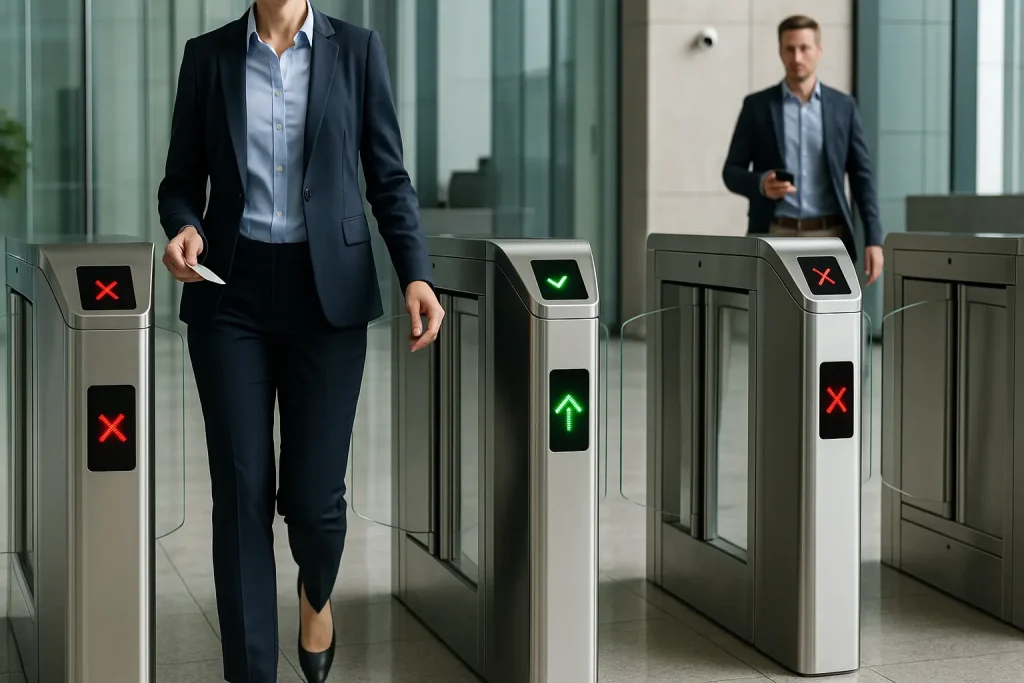
The modern solution is the RFID speed gate system. This is the perfect fusion of two technologies: the speed and security of a motorized speed gate, and the convenience and simplicity of a contactless RFID credential. It's the workhorse that keeps modern buildings secure, efficient, and moving.
This guide is a comprehensive, practical look at this essential system. We'll explore what it is, how the "tap" actually works, the critical (and often misunderstood) security differences between card types, and why this system remains the gold standard for modern access.
What Is an RFID Speed Gate System?
An RFID speed gate system is an integrated access control solution that combines a physical speed gate (the barrier) with an RFID reader (the "tap" point). It uses radio waves to wirelessly read a unique credential (like a card or fob) and then, upon validation, automatically opens its barriers to allow passage, all in a fraction of a second.
This is a complete "system" with three main components that must work in perfect harmony:
- The RFID Credential (The "Key"): This is the plastic card, key fob, or sticker that you carry. It contains a small chip and an antenna. It holds your unique identification number.
- The RFID Reader (The "Gatekeeper"): This is the device (usually a black square or circle) integrated into the turnstile. It constantly emits a low-power radio field, waiting for a credential to enter it.
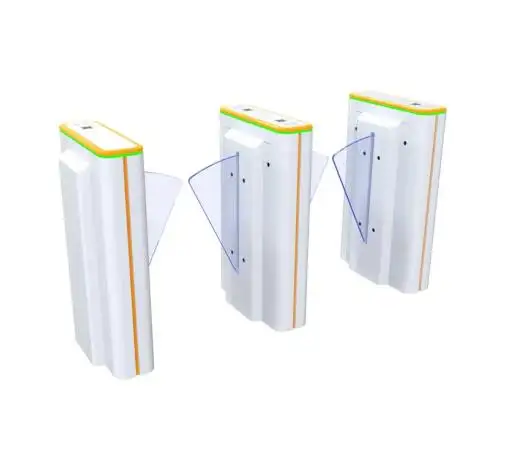
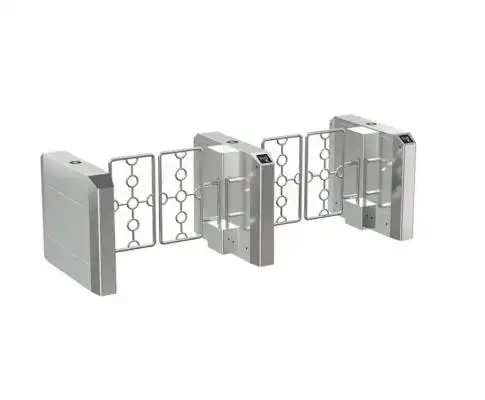
- The Speed Gate & Controller (The "Enforcer"): This is the physical high-speed pedestrian-turnstile with its glass barriers, motors, and sensors. It is connected to a "brain"—the speed-gate-access-control panel—that makes the final "allow" or "deny" decision.
When you tap your card, the reader doesn't make the decision. It just "reads" the card's number and passes it to the central control panel, which then checks its database and commands the gate to open. This entire "handshake" happens in milliseconds.
How Does the "Tap" (RFID) Actually Work?
The "tap" works using a process called inductive coupling. The RFID reader emits a radio field. When your passive RFID card (which has no battery) enters this field, the field's energy "wakes up" the card's chip. The chip then uses that energy to transmit its unique ID number back to the reader, which validates your access.
This may sound complex, but it's a brilliant and simple bit of physics. Let's break down that one-second interaction, step-by-step:
- Idle State: The RFID reader on the speed gate is emitting a constant, low-power radio field, waiting for a credential.
- The "Tap": You bring your access card (which is a "passive tag," meaning it has no battery) within a few inches of the reader.
- Powering On: The reader's radio field is "harvested" by the antenna coiled inside your plastic card. This energy is just enough to power up the card's tiny microchip.
- The "Handshake": The now-powered chip transmits its unique serial number (its "identity") back to the reader using the same radio waves.
- Validation: The reader "hears" this number and instantly sends it to the building's main access control panel (the "brain").
- The Decision: The control panel checks its database in milliseconds: "Is Card #4157 allowed in the Main Lobby on a Sunday at 4:00 PM?"
- The Command: If "YES," the panel sends a simple "open" signal (a dry contact) to the speed gate's logic board.
- The Action: The speed gate's motor activates, the barriers open, and you walk through.
This entire process is what defines a modern high-speed access control system: it's fast, contactless, and automatic.
Not All RFID Is Created Equal: A Critical Security Breakdown (125 kHz vs. 13.56 MHz)
This is, without question, the most important "expert" detail you must understand. Many people assume all access cards are the same. They are not. Using the wrong type of RFID is the difference between a secure building and a building with a front door that can be "cloned" for $20.
There are two main frequencies used in building access: Low Frequency (LF) and High Frequency (HF).
1. Low Frequency (LF) - 125 kHz: "Prox" (The Old, INSECURE Standard)
This is the "Prox Card" (like the "clamshell" card) that dominated the 1990s and 2000s. It's a "dumb" technology. The card only broadcasts its number, like a car's license plate. It has no encryption, no intelligence, and no security.
- Pros: It's cheap. The read-range can be decent.
- Cons: IT IS NOT SECURE. The card's data is unencrypted. A $20 cloning device from the internet can copy a 125 kHz prox card in two seconds from your back pocket without you ever knowing.
- My Expert Opinion: As a security professional, I can tell you that installing a new 125 kHz prox system in any modern building is an act of negligence. It provides the illusion of security while providing almost zero actual security against a moderately determined intruder.
2. High Frequency (HF) - 13.56 MHz: "Smart Cards" (The Modern, SECURE Standard)
This is the "Smart Card" technology (like NXP's MIFARE, HID's iCLASS). This is not just a "key"; it's a "microcomputer." The chip on the card has a processor and memory, and it can perform cryptographic functions.
- How it Works: When this card "taps" a reader, they don't just "talk"; they "interrogate" each other. The reader sends a challenge, and the card must provide a valid, encrypted response (a "secret key") before the reader will even listen to its ID number.
- Pros:
- Extremely Secure: Uses high-level encryption (like AES) that cannot be "cloned" by a simple device.
- Multi-Application: The card can be partitioned to hold other data. It can be your access card, your vending machine payment, your library card, and your secure print-release key, all in one.
- Cons: The cards and readers are slightly more expensive (but worth every penny).
Here is a simple breakdown for your security team:
| Feature | 125 kHz (Low-Frequency "Prox") | 13.56 MHz (High-Frequency "Smart Card") |
| Security | Extremely Low (Unencrypted) | High / Very High (Encrypted) |
| "Clonable"? | Yes, in 2 seconds with a $20 device. | No, not with simple cloning tools. |
| Technology | "Dumb" - Only broadcasts a static number. | "Smart" - Has a processor, memory, and performs crypto. |
| Common Names | Prox, ProxCard II | MIFARE DESFire, iCLASS, PIV |
| Best For | Legacy systems that need to be replaced. | All new installations. The modern standard. |
When you are planning a new RFID speed gate system, the only technology you should consider is 13.56 MHz High-Frequency.
Why Is an RFID Speed Gate System the Dominant Choice?
Even with the rise of new tech, the RFID speed gate system (using modern HF cards) remains the dominant choice for most commercial buildings. Why? It offers the perfect balance of speed, cost, reliability, and security.
1. The Perfect Balance of Speed and Convenience
It's just fast. The "tap-and-go" motion is a seamless part of a person's stride. It's a fast-access-turnstile experience that is intuitive and reliable. There's no "pause" to find a button, no "stop" to look at a camera, and no "failure to read" from a dirty fingerprint. This high-speed, frictionless experience is what makes it a true high-throughput speed gate.
2. High Reliability and User Acceptance
It just works. The technology is mature, stable, and not affected by external factors like:
- Bad lighting (which can fool facial recognition)
- Dirty or wet fingers (which defeat fingerprint scanners)
- A user wearing a hat or face mask
This reliability is why it's the "workhorse" of access control. Everyone knows how to use it, and the "failure to read" rate is near zero.
3. Cost-Effectiveness and Scalability
This is a huge factor. Plastic RFID cards are incredibly cheap to produce and issue, costing pennies on the dollar compared to high-end biometric scanners. This makes the system highly scalable. It's just as easy to manage 10,000 users as it is to manage 100.
4. Simple, Flexible Credential Management
The system behind the RFID card is powerful. An administrator can:
- Instantly issue a new card to a new employee.
- Instantly revoke a lost or stolen card, rendering it useless.
- Set time-based permissions (e.g., this employee's card only works 9-5, Monday-Friday).
- Set location-based permissions (e.g., this card opens the lobby but not the data center).
How Does RFID Compare to Other Credential Types?
While RFID is the dominant standard, it's not the only option. A smart facility plan often involves a mix of technologies.
RFID vs. Biometrics (Face/Fingerprint)
This is the big comparison: "What you have" (RFID) vs. "Who you are" (Biometrics).
- An
RFID speed gate systemis faster (for throughput), cheaper, and has no privacy concerns. Its main weakness is that the credential can be shared. - A biometric speed gate turnstile is more secure (you can't "share" your face) but is also more expensive, can be slower (except for advanced facial), and has significant privacy and data-enrollment hurdles.
Expert Take: For a standard "trusted" environment (like an office lobby for employees), RFID is often the better choice for its speed and simplicity. For a "high-security" environment (like a data center), biometrics are a necessary second layer of authentication.
RFID vs. Mobile Credentials (Bluetooth/NFC)
This isn't really a "vs." battle. Mobile access is the next generation of RFID.
- NFC (Near Field Communication): This uses the 13.56 MHz HF technology inside your smartphone. Your phone "emulates" a smart card. It's highly secure and convenient.
- Bluetooth (BLE): This is a long-range "hands-free" credential. You just walk up to the gate with your phone in your pocket, and it opens.
The future of the RFID speed gate system is this "invisible" credential, where the "key" just lives on the device you already carry.
| Credential Type | Main Benefit | Main Drawback | Best For... |
| RFID (HF Smart Card) | Balance of Speed, Cost, & Security | Can be lost, stolen, or shared | The "workhorse" for most corporate offices |
| Biometrics (Face/Print) | Highest Security (Verifies "Who") | Cost, Speed (except facial), Privacy | High-security areas (labs, data centers) |
| Mobile Access (NFC/BLE) | Highest Convenience (Phone is Key) | Relies on phone battery, complex setup | Modern offices prioritizing a "frictionless" user experience |
| 125 kHz Prox Card | (None, it's cheap) | Massive Security Flaw (Clonable) | Legacy systems that must be replaced. |
What Are the Security Risks of an RFID System? (And How to Solve Them)
As we've covered, the security of your system depends entirely on the technology you choose.
Risk 1: Card Cloning (The "Prox" Problem)
- The Problem: Using 125 kHz "Prox" cards is like leaving your front door unlocked. A $20 cloning device can copy an employee's card in their pocket on the subway, and you'd never know.
- The Solution: MANDATE 13.56 MHz HF Smart Cards. This is a non-negotiable requirement for any new system. The encrypted handshake between the card and reader defeats simple cloning.
Risk 2: Tailgating (The "Polite" Problem)
- The Problem: An
RFID speed gate systemdoes not stop tailgating. The RFID only authorizes the first person. It cannot stop a second person from politely following them through the open barrier. - The Solution: A High-Quality Gate. The gate itself must have its own anti-tailgating sensors. When the gate receives the "open" signal from the RFID reader, its own "eyes" (its internal sensors) take over to ensure only one person passes. This is a critical pairing.
Risk 3: Lost or Stolen Cards
- The Problem: An employee loses their card on Monday, but doesn't report it until Tuesday. For 24 hours, that card is a "master key" for whoever finds it.
- The Solution: A Robust Access Control "Brain." This is a policy problem solved by technology. Your speed-gate-access-control system must allow for instant remote deactivation of a lost card.
How to Plan and Implement a Successful RFID Speed Gate System
A successful project is all about the planning.
- Step 1: Conduct a Throughput Analysis.
- The "Expert" Step: Do not guess how many lanes you need. Stand in your lobby with a clicker during your busiest 15-minute period (e.g., 8:45-9:00 AM). Count every person.
- The Formula:
[Total People] / 15 = Peak People Per Minute (PPM). [Peak PPM] / 30 = Number of Lanes Needed (Round Up).- Example: You count 100 people in 15 minutes.
100 / 15 = 6.7 PPM.6.7 / 30 = 0.22. One lane is fine. - Example 2: You count 160 people in 15 minutes.
160 / 15 = 10.7 PPM.10.7 / 30 = 0.35. One lane is still fine. - Example 3: You count 500 people in 15 minutes.
500 / 15 = 33.3 PPM.33.3 / 30 = 1.11. You must round up. You need 2 lanes. This data is non-negotiable.
- Step 2: MANDATE 13.56 MHz HF Technology.
- Tell your vendor, "I will not accept any 125 kHz 'Prox' technology." This single sentence will protect your investment.
- Step 3: Choose Your Credential Form Factor.
- Will you use standard plastic cards? Key fobs? Or stickers that attach to the back of a smartphone?
- Step 4: Plan for All Users (ADA & Visitors).
- ADA: You are legally required to have at least one wider, ADA-compliant lane (32-36 inches). This is often a bidirectional-speed-gate that can be remotely opened by a guard.
- Visitors: How do guests get in? You can't issue them an RFID card for a 30-minute meeting. Your
entrance-speed-gate-systemmust also have a QR code/barcode scanner to handle visitors. This "multi-credential" approach is essential.
- Step 5: Integrate with Your "Brain."
- The readers and gates must be wired to your high-speed-access-control-system panel. This is a job for a professional integrator.
- Step 6: Plan for Card Management.
- Who has the authority to issue and revoke cards? Who will print them? This HR/IT policy is just as important as the hardware.
The Future: Long-Range RFID and "Frictionless" Access
The "tap" is fast, but the future is "frictionless." The next evolution of RFID is already here: Ultra-High Frequency (UHF).
- UHF RFID is the same technology used for electronic toll collection on a highway (like E-ZPass).
- A reader can identify a tag from 15-20 feet away.
- In a building, this means an employee can just walk toward the gate with their badge in their pocket, and the gate will open for them automatically. This is the ultimate
fast-access-turnstileexperience. - The Catch: It's less secure for a lobby because the long-range read is "wider" and less precise. It's difficult to know which of three people walking together the reader has scanned. For this reason, it's still best used for parking garages and an "inner" secure door, while the precise "tap" of HF remains the king of the lobby.
The Final Verdict: The Workhorse of Modern Access
The RFID speed gate system is, and will remain, the workhorse of the modern building. It provides the most practical, reliable, and cost-effective balance of speed and security.
While biometrics offer higher identity security and mobile credentials offer more convenience, the modern, encrypted 13.56 MHz smart card remains the global standard.
When you pair this high-speed, secure credential technology with a "smart" speed gate that has its own anti-tailgating sensors, you create a robust, efficient, and user-friendly entrance-speed-gate-system that will serve as the foundation of your building's security for years to come.
