


Turnstile Gate SDK & API: Integration Guide for Developers and System Integrators
2026-03-25


Ironman's turnstile gates support full SDK and API integration with third-party software systems — including ticketing platforms, HR attendance systems, visitor management tools, and building management systems. This guide covers what the turnstile gate SDK API package contains, which API types are supported, and how to test a live connection using Postman. If you are a developer or systems integrator evaluating a turnstile supplier, this is the technical reference you need before making a decision.
For cloud-connected deployments, see our cloud-based turnstile gate systems — these models include native API support out of the box.
SDK vs. API — What Each One Does for Turnstile Integration
A turnstile gate SDK and API serve different roles in the integration process. Understanding the distinction saves setup time and prevents the most common technical misunderstanding when starting a new project.
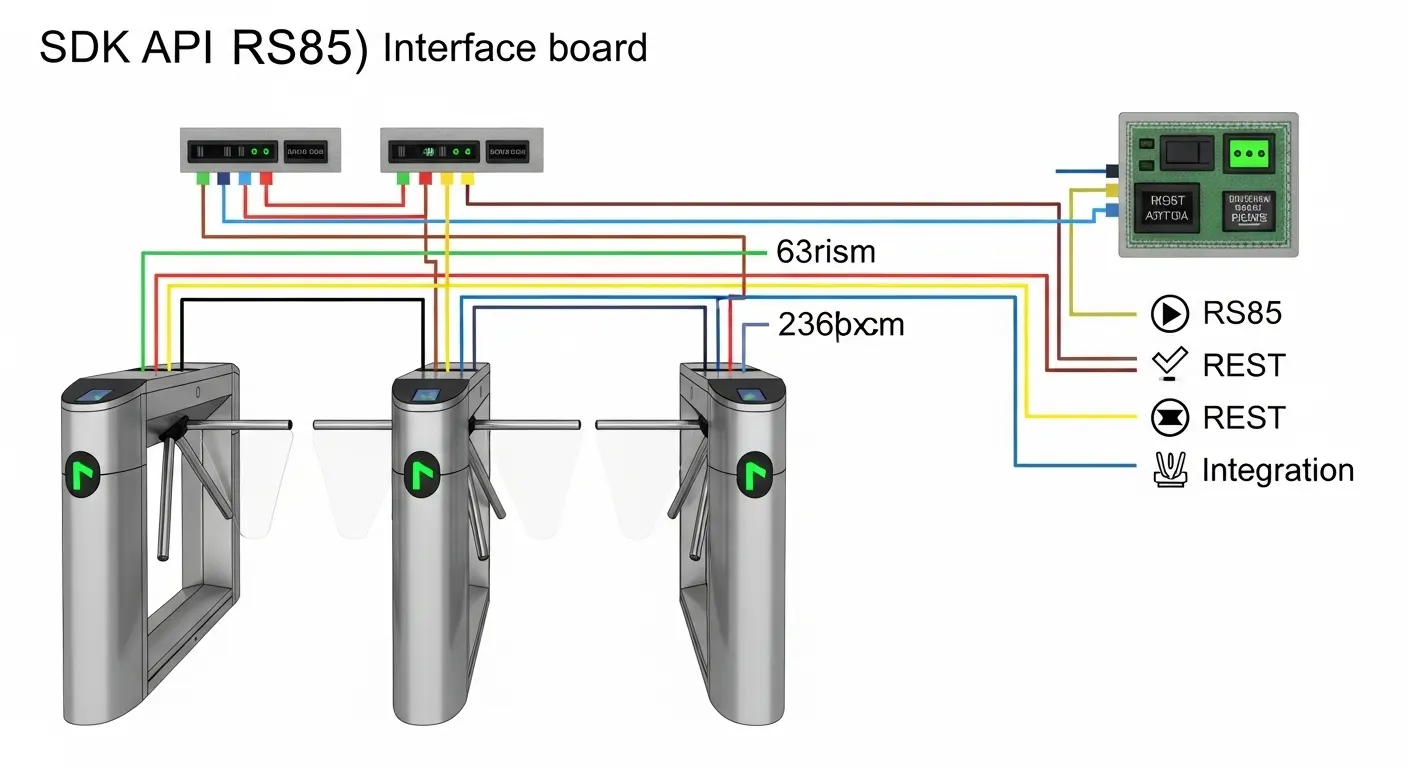
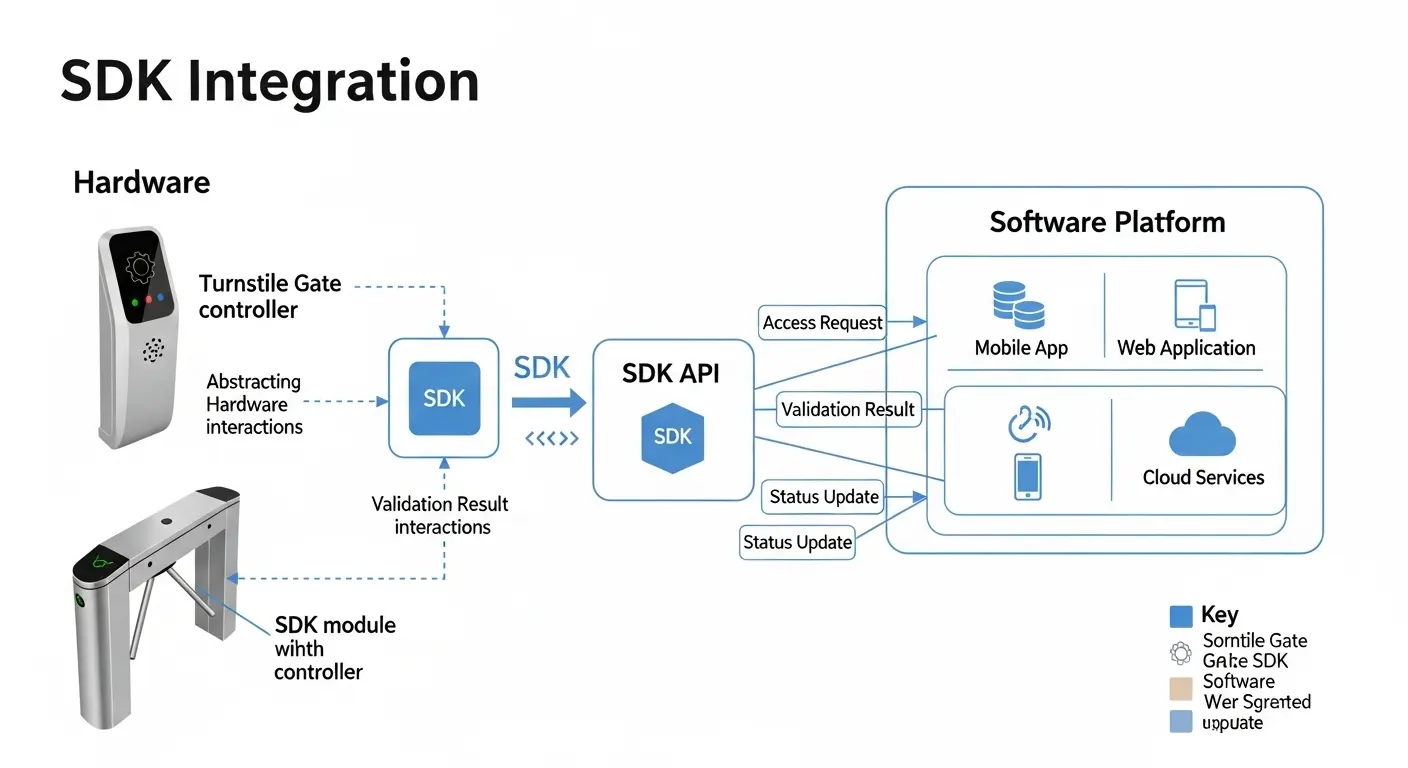
The SDK is the complete development package. It includes documentation, code samples, wiring specs, an interface board, and test utilities. You use the SDK during the setup and build phase — before your software goes live.
The API is the command interface that your software calls during live operation. Every time a user presents a credential at the gate, your platform sends an API request, and the turnstile controller responds with a result.
| SDK | API | |
|---|---|---|
| What it is | Full development package | Command and data interface |
| Who uses it | Developer during setup | Software during live operation |
| What it contains | Docs, code samples, interface board, test tools | Endpoints, parameters, response formats |
| When you need it | Integration and testing phase | Every gate transaction after go-live |
Think of it this way: the SDK is what you use to build the connection. The API is what runs it afterward.
What Ironman's Turnstile Gate SDK Package Contains
When you request an SDK package from Ironman, you receive more than a documentation file. The package covers everything a developer needs to complete a working integration from day one.
Documentation and Specification Files
The documentation package includes:
- Hardware protocol specification: Defines the communication format for Wiegand 26-bit and 34-bit, RS485 serial, and dry contact relay outputs
- API endpoint reference: Full command list, parameter definitions, and response code descriptions
- Wiring diagram: Connection layout for the API interface board to the gate's control port
- Supported credential types: RFID, QR code, biometric (Wiegand output from terminal), and PIN input
Every document ships with the hardware order. If your project requires custom credential mapping or non-standard protocols, Ironman's engineering team reviews requirements before shipping.
Software Tools and Sample Code
The software layer of the SDK includes:
- API interface board: A physical hardware component that bridges the turnstile controller to your software environment (local server, cloud endpoint, or on-premise PC)
- Code samples: Provided in common languages based on your project platform — including integration examples for HTTP POST request handling
- Test utilities: Used to verify API call success before connecting to a production system
- Direct IT support: Ironman's technical team assists with Postman test configuration and validates the first 50 live transactions during commissioning
In our experience deploying API integrations for venue and transit projects, the interface board and documentation together resolve 90% of integration questions before a single support ticket is needed.
API Types Supported by Ironman Turnstile Gates
Ironman's turnstile gates support three primary API integration paths. The right one depends on your software architecture, network environment, and credential type.
REST API (HTTP-Based)
REST API is the most common integration path for modern software platforms. Your application sends HTTP POST or GET requests to the turnstile's API endpoint. The controller responds with a JSON payload — credential valid/invalid, gate open/closed status, and an event timestamp.
This path suits SaaS ticketing platforms, web-based HR attendance systems, and cloud-hosted visitor management tools. It requires a network connection between your server and the turnstile's interface board — either LAN or internet, depending on the model.
SDK + Interface Board (Hardware-to-Software Bridge)
For environments without a network connection — including offline facilities, air-gapped security zones, or legacy on-premise ERP systems — the interface board connects directly to a local server or PC via RS485 or RS232.
The SDK provides the driver and library files your server needs to read gate signals and write access decisions back to the controller. This path is common in manufacturing facilities and corporate campuses running on-premise HR systems.
Wiegand Protocol Software Layer
When credential readers output Wiegand 26-bit or 34-bit signals, the SDK provides the parser library your software uses to interpret those signals. This is most relevant for HR attendance systems where RFID card readers are already wired to the turnstile controller.
Wiegand has been the industry de facto protocol since the 1960s and remains the most widely installed hardware communication standard in existing access control systems.
Step-by-Step API Integration Workflow
Completing a turnstile gate SDK API integration follows a clear six-step process. Most projects reach go-live within 48–72 hours of receiving the SDK package, provided the target software platform has an active API.
Steps 1–3: Setup and Connection
Step 1 — Request your SDK package: Contact Ironman with your project specifications — the gate model, credential type (QR code, RFID card, biometric terminal), and your target software platform. The engineering team confirms compatibility and ships the package.
Step 2 — Receive the SDK package: You receive the API interface board by mail and the documentation files by email. Review the API endpoint reference and wiring diagram before opening the gate cabinet.
Step 3 — Wire the interface board: Connect the interface board to the turnstile gate's control port using the wiring diagram. Power on the system and confirm the LED status indicators on the board show a live connection.
Steps 4–6: Testing and Go-Live
Step 4 — Configure the API endpoint: Set your software to send HTTP requests to the interface board's local IP address (for LAN installations) or cloud endpoint (for cloud-connected models).
Step 5 — Test with Postman: Load the API reference document into Postman. Build a test POST request with a sample credential payload — for example, a QR code string your ticketing system would generate. Send the request and confirm the gate responds with the expected JSON result. Ironman's IT team can review your Postman setup and validate test results directly if needed.
Step 6 — Connect to your production system: Once Postman tests pass, point your live software to the same endpoint. Monitor the first 50 real transactions before removing the test environment. After confirmation, the integration is production-ready.
Common Use Cases and Compatible Software Systems
The turnstile gate SDK API supports a wide range of software platforms across industries. These are the four most common deployment scenarios Ironman's engineering team handles.
- Ticketing and venue management: A QR code on the user's phone or printed ticket is scanned at the gate. The API sends the QR string to the ticketing platform, which returns a valid/invalid response. The gate opens only on a valid response. Used in stadiums, concert venues, exhibition halls, and theme parks.
- HR attendance and time tracking: An RFID card or fingerprint scan triggers an API call to the HR system. The system logs the entry time, employee ID, and gate lane. Used in manufacturing plants, logistics centers, and corporate offices.
- Visitor management systems (VMS): A pre-registered visitor receives a one-time QR code by email. When scanned at the gate, the API validates the code against the VMS and notifies the host. No front desk check-in required.
- Building management systems (BMS): The gate connects via RS485 to the BMS controller. Gate status, passage counts, and alarm events feed into the building dashboard in real time.
For enterprise platforms such as Lenel, Genetec, Brivo, or Honeywell Pro-Watch, confirm the API path (REST or RS485 SDK) with the Ironman team before specifying — compatibility varies by platform version.
For full-height security turnstile deployments in government or high-security facilities, the same SDK applies — the integration layer does not change based on gate form factor.
Hardware Protocol Reference for Developers
Choosing the right hardware protocol is the first decision in any integration project. This table shows the primary protocols Ironman turnstile gates support, their technical limits, and the best use case for each.
| Protocol | Type | Range | Devices per Line | Best Use Case |
|---|---|---|---|---|
| Wiegand 26/34-bit | Hardware | ≤150m | 1 per controller port | RFID reader → controller |
| RS485 | Serial | ≤1,200m | Up to 32 | Panel-to-gate, BMS integration |
| RS232 | Serial | ≤13m | 1 per port | Debugging, firmware update |
| Dry Contact (VFC) | Hardware | Short range | N/A | Simple open/close relay |
| REST API (HTTP) | Software | LAN/Internet | Unlimited | Cloud ticketing, HR, VMS |
| OSDP V2 | Hardware | ≤1,200m | Multiple | High-security, AES-128 encrypted |
For pure software integrations: REST API is the correct path. For hardware-to-software bridging in networked environments: RS485 with the SDK interface board is standard. OSDP V2 is recommended for deployments requiring AES-128 encrypted reader communication — particularly relevant for government, healthcare, and data center access points.
For projects deploying smart speed gate turnstiles at high-throughput entries, REST API via LAN is the preferred integration path — it handles sustained transaction rates of 40–60 persons per minute per lane without queuing delays.
Frequently Asked Questions
Q1: What is the difference between a turnstile gate SDK and API?
The SDK is the complete development package you use to build the integration — it includes documentation, code samples, an API interface board, and test tools. The API is the command interface your software calls during live operation. You need the SDK to set up the connection. You use the API every time the gate processes a credential after go-live.
Q2: Does the Ironman turnstile gate SDK support QR code and biometric integration?
Yes. The SDK supports QR code validation via REST API (your ticketing or VMS platform provides the QR response), RFID card reading via Wiegand 26/34-bit, and biometric terminals that output a Wiegand signal. For facial recognition terminals with proprietary protocols, Ironman's engineering team reviews compatibility before confirming the SDK package.
Q3: Is the turnstile gate SDK free or does it cost extra?
The SDK documentation and API reference are provided at no extra cost with confirmed gate orders. The API interface board is a physical hardware component shipped with the gate. Contact the Ironman sales team to confirm SDK inclusion for your specific order and project scope.
Q4: How long does it take to complete a turnstile API integration?
Most integrations reach go-live within 48–72 hours of receiving the SDK package, provided the target software platform has an active API and a developer available for testing. More complex multi-gate or ERP integrations may take 5–10 business days. Ironman's IT team provides direct support during the testing phase, which reduces back-and-forth significantly.
Q5: Can I integrate a turnstile gate with an existing HR attendance or ERP system?
Yes. The SDK's RS485 and REST API paths both support integration with HR attendance platforms and ERP systems. You will need to confirm your ERP has an available API endpoint or supports RS485 serial communication. Ironman's team can review your system's API documentation and advise on the correct integration path before you order.
Q6: What happens if the API connection to the turnstile gate goes offline?
Ironman turnstile gates with onboard credential storage can continue operating in offline mode — the controller uses locally cached access rules to approve or deny entry. Once the API connection restores, the gate syncs event logs and any credential updates automatically. This offline fallback is essential for facilities that cannot accept gate downtime during network interruptions.
Getting Your Integration Started
The right integration path comes down to three choices: your software type (cloud or on-premise), your credential type (QR code, RFID, biometric), and your facility scale. Ironman provides a full SDK package — interface board, protocol documentation, API reference, and code samples — with confirmed gate orders, plus direct IT support during testing.
The global access control market is growing at 4.08% CAGR, with turnstile gate systems at the center of enterprise security deployments. Getting the software integration right from day one protects that investment long term.
Request your SDK package and project specification by contacting the Ironman team through our turnstile gates wholesale and project page. Include your gate model requirement, credential type, and target software platform — and expect a technical response within 12 business hours.
